# Rails API Authentication with the auth generator
The Single-Page Application madness is a part of the past and Hotwire is the go-to alternative for interactive Rails applications.
However, there are some use cases where building an API-only Rails app makes sense: mobile apps, teams that are comfortable with FE frameworks or multi-platform applications.
In this article we will learn how to add **user authentication with the Rails 8 auth generator in API-only apps.**
Let's start by understanding the different authentication approaches in Rails API apps. If you're already familiar with them, skip to the app setup section.
## API authentication approaches
There are many approaches we can take to tackle API-only authentication. Each one of them comes with trade-offs that we should consider:
### Session-based authentication
This approach is basically the same as the traditional authentication solutions where we return an encrypted cookie that contains information about the user and the session after the user authenticates with valid credentials.
This is the approach that Rails uses with the [auth generator](https://avohq.io/blog/rails-8-authentication). A good thing about this approach is that we don't need to explicitly include the cookies with every request as the browser handles this for us.
The flow of this approach in API-only applications looks something like this:
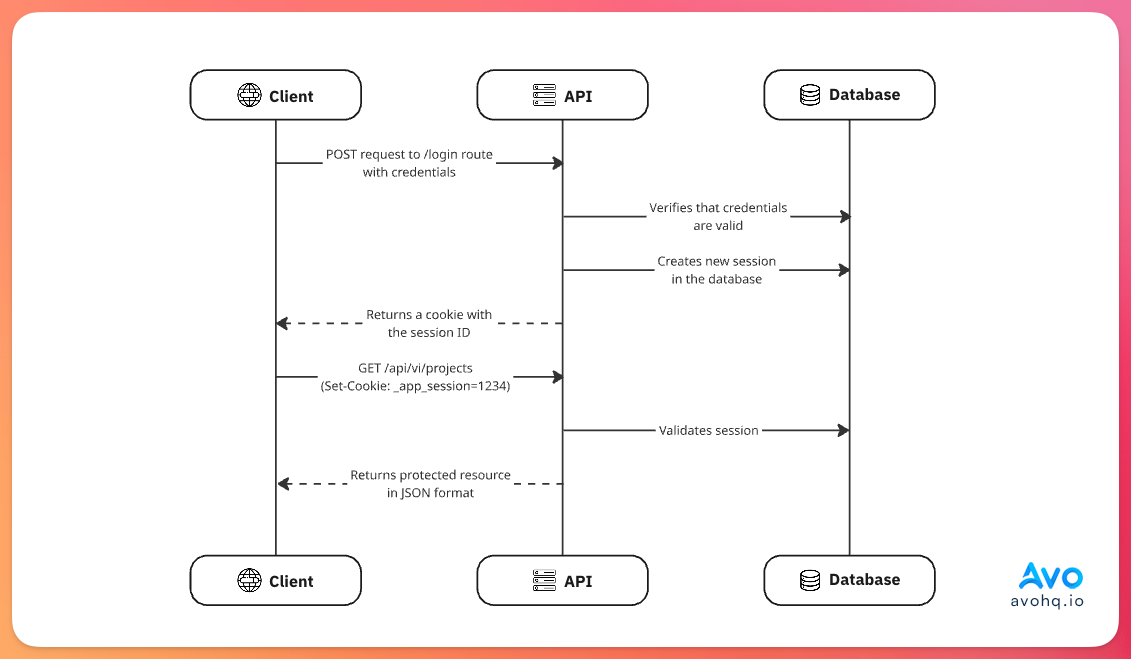
The main benefits of this approach are:
- **Sessions are stored in secure cookies:** these are inaccessible to JavaScript which reduces the risk of XSS attacks.
- **Server-managed session state:** as we don't return tokens with expiration dates, we can manage session state in the server. For example, if a user wants to delete their account, we can terminate every session associated with its ID since they're persisted in the server. This is not the case when using JSON Web Tokens where we need to do extra work to achieve the same thing.
- **Rails defaults:** we can take advantage of Rails, and other authentication libraries, defaults as they're designed around session authentication.
However, there are some cons when we use this approach:
- **Not mobile app friendly:** while we can make sessions work with mobile apps, we will be fighting against the platform's patterns and practices while also losing security benefits like HTTPOnly and CSRF protection that make sense for cookies.
- **Same domain requirements:** session cookies are restricted by the browser's same-origin policy and only work reliably when the client and the API share the same domain. This becomes an issue with some architectures and, while subdomain sharing is possible it can become an issue down the line.
- **Session overhead:** every authenticated request requires a database or cache lookup to validate the session and retrieve user information. This might not be a big deal in some cases but it still needs to be considered.
- **Third-party integration limitations:** if we need to provide API access to external developers, session-based authentication doesn't work well which introduces the need for API keys or tokens anyway.
All things considered, this approach can be good if we don't need mobile apps or we don't think our application will reach the point where the disadvantages can be relevant.
### JSON Web Tokens
JWT is a stateless authentication approach where user information and auth data are encoded into a self-contained token.
Instead of storing session data on the server, the necessary information for authentication is embedded in the token itself.
A JWT token looks like this:
```text
eyJhbGciOiJIUzI1NiIsInR5cCI6IkpXVCJ9.eyJzdWIiOiIxMjM0NTY3ODkwIiwibmFtZSI6IkpvaG4gRG9lIiwiaWF0IjoxNTE2MjM5MDIyfQ.SflKxwRJSMeKKF2QT4fwpMeJf36POk6yJV_adQssw5c
```
It has three distinct sections separated by a dot: the header which includes the algorithm and token type, the payload which contains the user data and the signature which is used to verify that the token is valid server-side.
The JWT flow looks like this:
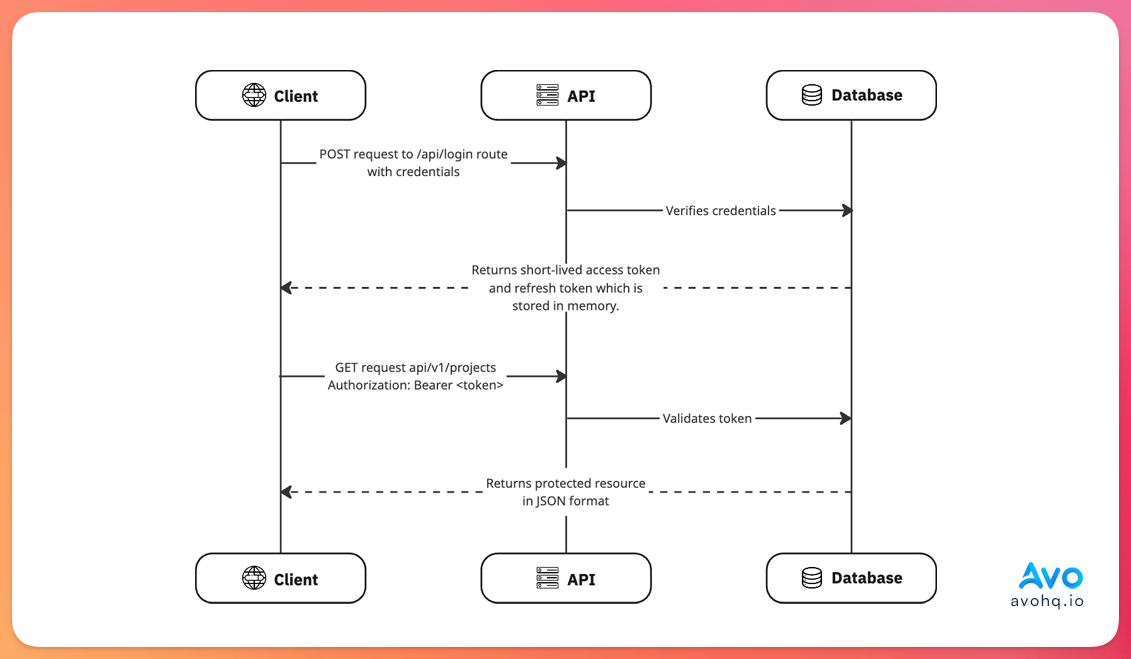
The benefits of using JWT for API authentication are:
- **It's stateless:** it means that we're not required to have server-side session storage or management which means that it can better scale horizontally than session-based auth.
- **No database lookups needed:** as tokens contain information about the user associated with them, we can save DB lookups for users and the corresponding session.
- **Mobile app friendly:** as the token can be stored in memory and appended to every request with an `Authorization` header, JWTs lend themselves to mobile apps naturally.
However, this approach has some cons:
- **Security considerations:** there are many security-related things to consider when using JWTs. If the user has access to the token and it's still valid, they can access protected resources even if we don't want them to which means we have to handle that on top of implementing authentication. Moreover, XSS attacks are possible because malicious third-party scripts could exploit a vulnerability and access `localStorage` so that's something we need to consider.
- **Logout complexity:** true logout requires that we blocklist tokens which defeats the stateless feature of JWT.
- **Expiration management:** to add this feature securely, we need to add mechanisms to handle token refresh in the server and each client application.
Considering this, JWT authentication can be a good fit if we need mobile apps, cross-domain authentication needs and horizontal scaling provided we handle token refresh and invalidation properly.
It's a poor fit if we just require a browser SPA, if unauthorized momentary access is critical, or if we have to keep track of sessions in a centralized manner.
All things considered, we cannot implement basic JWT auth and call it a day, we have to be careful with how we handle scenarios like account deletion, user banning, logouts, etc.
### Bearer Tokens
Bearer token auth is a stateless approach where we generate a random token that's associated with the user, store it in the database, return it to the client which then uses it to make requests to our API with an `Authorization: Bearer ` header.
The main difference with JWT authentication is that tokens are opaque: they don't contain information about a user beyond the token itself and, because they're persisted in the database, we can easily expire them server-side, and unauthorized access won't be possible because every request requires a database lookup.
The flow looks something like this:
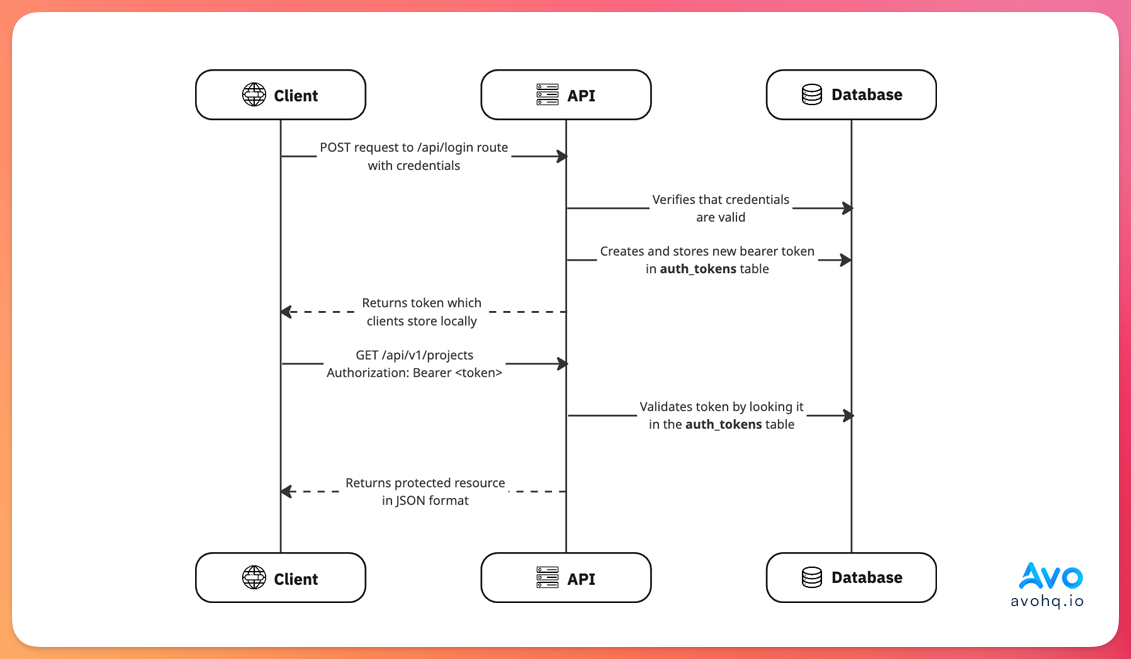
The benefits of using token-based authentication in API-only applications are:
- **Database controlled revocation:** we can immediately revoke tokens by deleting rows from our database. This gives us more granular control and we can also revoke specific devices or sessions.
- **Security benefits:** as tokens are opaque, no user data is exposed. We can also track token usage, rate limiting per token and add permission scoping to control what each token can access.
- **Flexibility:** tokens work across platforms without domain restrictions.
Some cons are:
- **Required database lookups:** every request requires a database lookup to validate the token. This can become a performance issue down the line.
- **XSS vulnerability:** just like JWT tokens. If stored in `localStorage`, malicious scripts can exploit a vulnerability to access user tokens.
- **Token management:** we need to implement proper token expiration, rotation, and cleanup to handle expired tokens that can pile up in the database.
Considering pros and cons, bearer tokens are ideal for API-only applications if:
- We need to serve mobile apps and cross-domain clients.
- We need granular session control.
- The database overhead is acceptable.
If your application is simple and doesn't strictly need token revocation or multiple device management, JWT can be preferable.
{{info}}
In the context of authentication, stateless means that our server is not required to keep track of session state which also implies that there's no shared state required between servers.
{{/info}}
## What we will build
To show how to add authentication in API mode with the Rails generator, we will build a simple app that allows us to create projects like the one we used in the [Superglue Rails](https://avohq.io/blog/superglue-rails) app.
Because one of the main reasons to build API-only apps in Rails is to serve mobile applications, we will use token-based authentication storing the tokens in the `sessions` table by adding a `token` field to it.
The requirements for our application are:
- Add the ability to log in and sign up by passing the appropriate credentials.
- Ability to log out which revokes the session and the token for the user.
- Password reset ability.
- Add tests for every flow.
{{info}}
We are using token-based authentication because it's a nice tradeoff between using cookies and JWT, and it integrates correctly with Rails generated authentication.
{{/info}}
## Application Setup
Let's start by creating a new Rails app in API mode:
```shell
rails new api_auth --api
```
This configures a more limited set of middleware in comparison with traditional Rails apps, makes the `ApplicationController` inherit from `ActionController::API` that doesn't contain features primarily used in browser apps and configures the generators to skip views, helpers, and assets when generating resources.
The next step is to run the Rails auth generator:
```shell
bin/rails generate authentication
```
This adds 2 db-persisted models: `User` and `Session` and a `Current`model which is used to retrieve users globally.

Luckily, when we run the generation command in API-only applications, views, helpers are not added so we don't have to worry about that.
The next step is to add a `token` field to the `sessions` table so let's add a migration for that:
```shell
bin/rails generate migration add_token_to_sessions token:uniq
```
This migration will add a unique index to the `token` as we want to enforce uniqueness at the database level.
Then, let's create a basic `Project` model so we can test our API access later:
```shell
bin/rails generate model Project user:references title:string description:text
```
And, we also add the corresponding associations to the `User`
```ruby
class User < ApplicationRecord
has_many :projects, dependent: :destroy
end
```
And to the `Project`:
```ruby
class Project < ApplicationRecord
belongs_to :user, optional: false
end
```
To make sure everything works, we will add tests with Minitest.
Now that we have everything set up let's start adding the feature:
## Rails 8 Auth in API mode
The first thing we need is to make sure that when creating a new `Session` we also create a token.
For this purpose, we can use a callback:
```ruby
class Session < ApplicationRecord
# Rest of the code
before_validation :generate_token, on: :create
private
def generate_token
self.token = SecureRandom.base58(32)
end
end
```
Or, the `has_secure_token` method, which is basically the same thing but reduces the amount of code we have to write:
```ruby
class Session < ApplicationRecord
has_secure_token :token
end
```
Next, let's create routes for the login:
```ruby
# config/routes.rb
namespace :v1 do
resource :session
end
```
Then, we have to modify the `Authentication` concern as we won't be using cookies for this feature.
First, we rename the `find_session_by_cookie` method to `find_session_by_token` and change the invocation in the `resume_session` method:
```ruby
module Authentication
# Rest of the code
private
def resume_session
Current.session ||= find_session_by_token
end
def find_session_by_token
authenticate_with_http_token do |token, options|
Session.find_by(token: token)
end
end
end
```
To make the `authenticate_with_http_token` work, we need to include the following in our `ApplicationController`:
```ruby
class ApplicationController < ActionController::API
include ActionController::HttpAuthentication::Token::ControllerMethods
end
```
The next thing we should do is remove the `helper_method :authenticated?` line because we don't have access to them in API-only mode.
Then, we modify the `require_authentication` method so if it's unable to resume the session because it can't find a `Current.session` or find the session by token, we render an unauthorized response:
```ruby
module Authentication
# Rest of the code
private
def require_authentication
resume_session || render_unauthorized
end
def render_unauthorized
render json: { error: "Unauthorized" }, status: :unauthorized
end
end
```
Finally, we modify the methods to start and terminate sessions:
```ruby
module Authentication
# Rest of the code
private
def start_new_session_for(user)
user.sessions.create!(user_agent: request.user_agent, ip_address: request.remote_ip).tap do |session|
Current.session = session
end
end
def terminate_session
Current.session.destroy
end
end
```
Now, we can remove the `SessionsController` added by the generator and create one under the `v1` namespace with the login logic:
```ruby
class V1::SessionController < ApplicationController
allow_unauthenticated_access only: [:create]
def create
if user = User.authenticate_by(session_params)
start_new_session_for(user)
render json: { token: Current.session.token }
else
render json: { error: "Invalid email address or password" }, status: :unauthorized
end
end
private
def session_params
params.permit(:email_address, :password)
end
end
```
Next, let's add the ability to sign out to the controller. In there, we just have to call `terminate_session` and render a message:
```ruby
class V1::SessionController < ApplicationController
# Rest of the code
def destroy
terminate_session
render json: { message: "Logged out" }, status: :ok
end
end
```
### Adding tests
Let's create fixtures for the `User` model:
```yml
# test/fixtures/users.yml
<% password_digest = BCrypt::Password.create("password") %>
one:
email_address: one@example.com
password_digest: <%= password_digest %>
two:
email_address: two@example.com
password_digest: <%= password_digest %>
```
Then, for the `Session`:
```yml
# test/fixtures/sessions.yml
one:
user: one
token: <%= SecureRandom.base58(32) %>
ip_address: "192.168.1.100"
user_agent: "Mozilla/5.0 (Macintosh; Intel Mac OS X 10_15_7) AppleWebKit/537.36"
two:
user: two
token: <%= SecureRandom.base58(32) %>
ip_address: "10.0.0.50"
user_agent: "Mozilla/5.0 (Windows NT 10.0; Win64; x64) AppleWebKit/537.36"
```
Then, we can test
```ruby
# test/integration/v1/session_controller_test.rb
require "test_helper"
class V1::SessionControllerTest < ActionDispatch::IntegrationTest
test "should create session" do
post v1_session_path, params: { email_address: users(:one).email_address, password: "password" }
assert_response :success
end
test "should not create session with invalid credentials" do
post v1_session_path, params: { email_address: users(:one).email_address, password: "invalid" }
assert_response :unauthorized
end
test "should destroy session" do
assert_changes -> { Session.count } do
delete v1_session_path, headers: { "Authorization" => "Bearer #{sessions(:one).token}" }
end
assert_nil Current.session
assert_response :success
end
test "should not destroy session with invalid token" do
delete v1_session_path, headers: { "Authorization" => "Bearer invalid" }
assert_response :unauthorized
end
end
```
## Registration
Now that we have the sessions working, let's add the ability for users to sign up to our app.
Let's start by adding the `registration` resource:
```ruby
Rails.application.routes.draw do
namespace :v1 do
# Rest of the routes
resources :registrations, only: %i[create]
end
end
```
Then, let's add the `RegistrationsController` to handle user creation and returning the session token:
```ruby
class V1::RegistrationsController < ApplicationController
allow_unauthenticated_access only: %i[ create ]
def create
user = User.new(user_params)
if user.save
start_new_session_for(user)
render json: { token: Current.session.token, user: user.as_json }, status: :created
else
render json: { error: user.errors.full_messages }, status: :unprocessable_content
end
rescue ActiveRecord::RecordNotUnique => e
render json: { error: ["There was a problem creating your account"] }, status: :unprocessable_content
end
private
def user_params
params.permit(:email_address, :password, :password_confirmation)
end
end
```
{{info}}
We're rescuing from `ActiveRecord::RecordNotUnique` because we have a database constraint so the `create` action would throw an error and fail without providing useful feedback to the user.
{{/info}}
With this, users will be able to create new accounts and then use the token for subsequent requests to our application.
Now let's add the corresponding tests for this feature:
```ruby
# test/integration/v1/registrations_controller_test.rb
require "test_helper"
class V1::RegistrationsControllerTest < ActionDispatch::IntegrationTest
test "should create user" do
params = {email_address: "test@example.com", password: "password", password_confirmation: "password"}
assert_changes -> { User.count } do
post v1_registrations_path, params: params
end
assert_response :success
assert_equal "test@example.com", User.last.email_address
end
test "should not create user with non-matching passwords" do
params = {email_address: "test@example.com", password: "password", password_confirmation: "pass"}
assert_no_changes -> { User.count } do
post v1_registrations_path, params: params
end
assert_response :unprocessable_content
end
test "should not create user with duplicated email address" do
params = {email_address: "test@example.com", password: "password", password_confirmation: "password"}
post v1_registrations_path, params: params
assert_response :success
assert_no_changes -> { User.count } do
post v1_registrations_path, params: params
end
assert_response :unprocessable_content
end
end
```
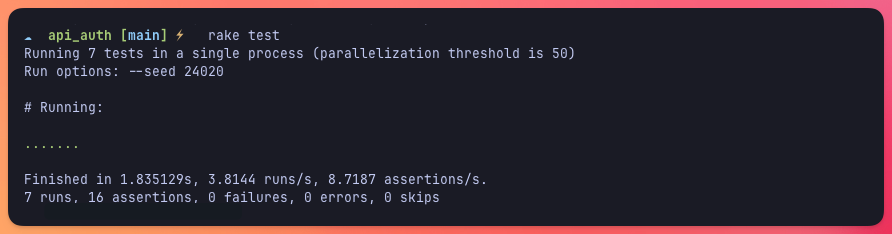
With this in place, if we run our tests everything should be green:
## Password reset
To achieve feature parity with the Rails generator authentication we still have to add the password reset feature.
Luckily, we can reuse the mailer and most of the controller. Let's start by adding a `V1::PasswordsController`:
```ruby
class V1::PasswordsController < ApplicationController
allow_unauthenticated_access only: %i[ create ]
def create
if user = User.find_by(email_address: params[:email_address])
PasswordsMailer.reset(user).deliver_later
end
render json: { message: "Password reset instructions sent" }
end
end
```
Now, let's add a test for this flow so we know that the email was enqueued when the user requested a password reset:
```ruby
# test/integration/v1/passwords_controller_test.rb
require "test_helper"
class V1::PasswordsControllerTest < ActionDispatch::IntegrationTest
test "should send password reset instructions" do
assert_enqueued_emails 1 do
post v1_passwords_path, params: { email_address: users(:one).email_address }
assert_response :success
end
response_data = JSON.parse(response.body)
assert_equal "Password reset instructions sent", response_data["message"]
end
test "should not send password reset instructions if user does not exist" do
assert_no_enqueued_emails do
post v1_passwords_path, params: { email_address: "nonexistent@example.com" }
assert_response :success
end
end
end
```
Next, let's add the actual password update action and tests. The request has to include the code that we use to identify the user to make sure the password request change is legit:
```ruby
class V1::PasswordsController < ApplicationController
allow_unauthenticated_access only: %i[ create update ]
before_action :set_user_by_token, only: %i[ update ]
# Rest of the code
def update
if @user.update(params.permit(:password, :password_confirmation))
@user.sessions.destroy_all
render json: { message: "Password has been reset." }
else
render json: { errors: @user.errors.full_messages }, status: :unprocessable_content
end
end
private
def set_user_by_token
@user = User.find_by_password_reset_token!(params[:token])
rescue ActiveSupport::MessageVerifier::InvalidSignature
render json: { errors: ["Password reset link is invalid or has expired."] }, status: :unauthorized
end
end
```
Now, let's add tests to cover the actual password update:
```ruby
require "test_helper"
class V1::PasswordsControllerTest < ActionDispatch::IntegrationTest
# Rest of the code
test "should reset password" do
user = users(:one)
token = user.password_reset_token
new_password = "newpassword"
put v1_password_path(token), params: { password: new_password, password_confirmation: new_password }
assert_response :success
assert user.reload.authenticate(new_password)
assert_equal 0, user.sessions.count
end
test "should not reset password if passwords do not match" do
user = users(:one)
token = user.password_reset_token
new_password = "newpassword"
put v1_password_path(token), params: { password: new_password, password_confirmation: "wrongpassword" }
assert_response :unprocessable_entity
response_data = JSON.parse(response.body)
assert_equal ["Password confirmation doesn't match Password"], response_data["errors"]
end
end
```
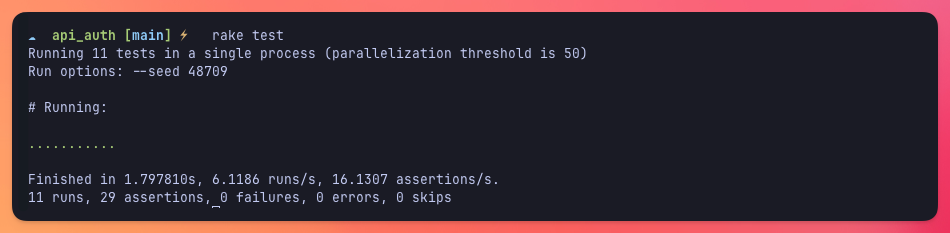
Now, all of our tests should be passing:
{{warning}}
As a security measure, after resetting a password we destroy every session that's associated with the user. You might want to make this optional or ask the user about it but consider this is as an important decision to make.
{{/warning}}
## Protecting resources
The best part about using the **Rails Auth generator in API mode** is that resources are protected by default unless we add the `allow_unauthenticated_access`.
So, to test this, let's add a `ProjectsController` so we can fetch our projects:
```ruby
class V1::ProjectsController < ApplicationController
def index
render json: { projects: current_user.projects.map(&:as_json) }
end
end
```
Now, as simple as that, we can get our associated projects if get make a GET request to `/v1/projects` with the appropriate `Authorization` headers.
Let's add a simple test to make sure it's working:
```ruby
class V1::ProjectsControllerTest < ActionDispatch::IntegrationTest
test "should get index for authenticated user" do
session = sessions(:one)
get v1_projects_path, headers: { "Authorization" => "Bearer #{session.token}" }
assert_response :success
response_data = JSON.parse(response.body)
assert_equal session.user.projects.count, response_data["projects"].count
end
end
```
Let's show how to integrate this with our application:
## Integrating with a frontend app
Now that we have everything working as expected, let's integrate our Rails API with a frontend app. In this case, I used a simple React application with a home page, sign-in and sign-out pages and a password reset flow.
The first thing we need to do in our Rails app is to add CORS configuration using the `rack-cors` gem:
```shell
bundle add rack-cors && bundle install
```
Then, we have to add an initializer to configure it in our app:
```ruby
# config/initializers/cors.rb
Rails.application.config.middleware.insert_before 0, Rack::Cors do
allow do
origins 'localhost:3001', '127.0.0.1:3001'
resource '*', headers: :any, methods: [:get, :post, :patch, :put, :delete, :options, :head]
end
end
```
With CORS properly set up we just have to make sure to store the `token` we get after a successful login attempt and use it for subsequent requests and also make sure to generate the appropriate auth context.
For this, we can use Redux like we did in the [Superglue Rails tutorial](https://avohq.io/blog/superglue-rails), React Context or other global store alternatives. That's up to us.
The actual API integration is highly dependent on our needs. This is how a simple integration looks:
{{gumlet video_id="68abc49bcd4a3cfd54d3b4c2" width="1898" height="812" /}}
## Summary
There are many approaches to handle authentication in Rails API-only apps, each with their pros and cons that should be carefully considered based on your application's needs:
- **Session-based authentication:** works well for browser-based SPAs sharing the same domain but struggles with mobile apps and cross-domain scenarios.
- **JWT tokens** offer stateless authentication perfect for mobile apps but come with security complexities around token management and logout.
- **Bearer tokens** provide a middle ground with database-controlled revocation and better security, though they require database lookups for every request.
The Rails 8 auth generator can be adapted for API-only mode by modifying the authentication concern to use HTTP token authentication instead of cookies, adding token generation to sessions, and creating API controllers that return JSON responses.
Some important things to consider are: setting tokens with `has_secure_token`, using `authenticate_with_http_token` for token validation, and building controllers for registration, login, logout, and password reset.
I hope you enjoyed this article and that it can help you implement the feature for your projects.
Have a good one and happy coding!