# Adding Breadcrumbs to a Rails Application
Helping users navigate through our site with ease helps them reach their desired destination thus improving their experience within our application.
Breadcrumbs play a crucial part in this: they give users a clear idea of where they are and provide them a path to reach
In this article, we will learn **how to add breadcrumbs to a Rails app** using the different types of breadcrumbs and way to add them in Rails applications.
Let's start by seeing why breadcrumbs are important. If you're already familiar with the jump to the adding breadcrumbs to Rails apps section
## Why breadcrumbs?
The main reason to add breadcrumbs to any application is to improve user experience: they give a clear indication of where the user is on the page and the navigation paths that can be taken from there on.
They can help users reach a desired outcome faster without the need to know anything about our site beforehand while lowering the bounce rate at the same time.
Besides this user experience improvement, breadcrumbs show up in search results to give a quick glance of what a site contains
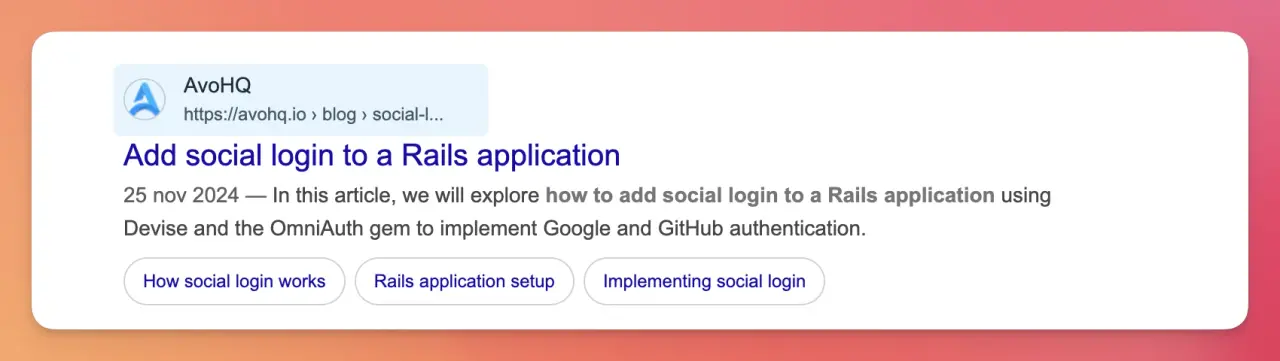
Search engines also love breadcrumbs because they help them figure out how our sites are structured and use them to improve the way they crawl our sites.
As an added bonus, good user experience in the form of engagement, lower bounce rates, and time spent on our site are ranking factors so, producing a good navigation experience can help get more organic traffic.
{{info}}
Breadcrumbs got their name from "Hansel and Gretel”, a popular fairy tale narrating the story about two siblings that are lost in the forest where one of them drops small pieces of bread along the path to help them find their way back home through the forest.
{{/info}}
## Types of breadcrumbs
There are roughly three types of breadcrumbs, and we should pick one depending on the needs of our users: the goal should be to make navigation faster and more efficient:
### Hierarchical
These follow the site structure hierarchically with the home page, or other relevant sections, being the root.
They are the most common type of breadcrumbs and show users where they are within our site's structure and give them the ability to access the most relevant parts of our site in a couple of clicks.
For example: **Products -> Electronics -> Smart watches -> Apple Watch**.
Sometimes hierarchical breadcrumbs form a parent-children relation where every breadcrumb, except the root, is a descendant of the breadcrumb to the left.
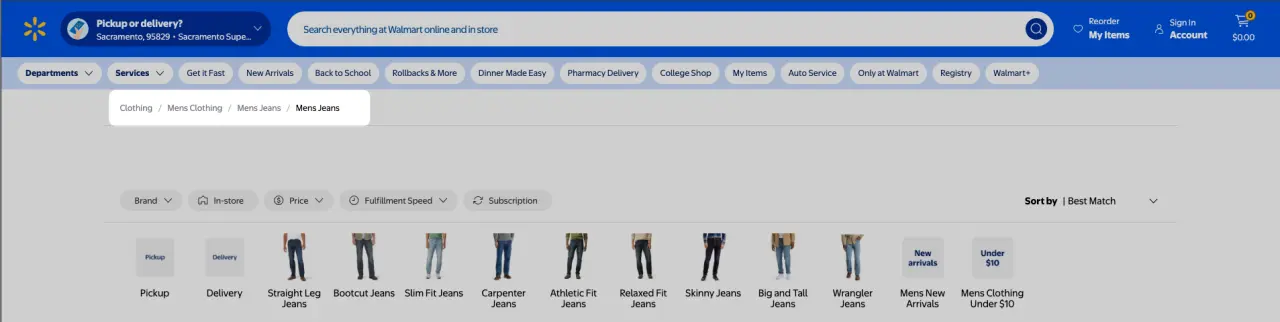
An example from inside Avo's [Rails Admin](https://avohq.io/rails-admin) panel:

### Filter or attribute-based
These are common for collection pages where filters can be applied. They are usually complementary to hierarchical breadcrumbs, and they allow us to quickly see the filters we applied to a given collection.
The particular thing about attribute-based breadcrumbs is that they might not generate new URLs or even produce an actual visit, they are just a way to make visually clear the steps the user took to reach a given point, in this case: the collection that's actually on the page.
Here's an example where a site is using a mix of hierarchical and attribute-based breadcrumbs:

On the top of the page we can see the hierarchy, and below the filtering options we can see the applied filters with **Women / Accessories** and **Sunglasses** applied by default and the applied filters displayed right to the side of them.
{{info}}
Some people might call this type of breadcrumbs **tags** or **applied filters** and don't think about them as breadcrumbs at all. However, even if we're not using links to display them and search engines might ignore them, they're breadcrumbs in the sense that they give users visual feedback on the path they took to reach their destination.
{{/info}}
### History-based
These are also complementary with hierarchical breadcrumbs. They generally have one or more links to track the previous pages we visited irrespective of their hierarchy.
An example from an e-commerce site:

This is a listing for a specific guitar that was accessed from a search query for **“Gibson SG”**. Clicking on “Volver al listado” (Back to the listing) will take us back to the search page that responded to our query.
This type of breadcrumbs is useful for big sites where users have multiple ways to reach to the same page.
Now that we saw the different types of breadcrumbs let's see what we will build.
## What we will build
For this particular tutorial we will build a breadcrumbs component with the following requirements:
- We should be able to generate a list of breadcrumbs inside controllers.
- A particular breadcrumb can render a link or text depending on whether the argument is a path, URL, or plain text.
- A breadcrumb can be represented with text exclusively or next to an icon like a “home” icon for the root path.
- The breadcrumb component should produce the adequate [schema markup](https://avohq.io/structured-data-rails).
- The breadcrumb component should accept a special type of path or URL to produce a history/hierarchical type of breadcrumb.
- In case it's required, we should be able to pass `turbo: false` to individual links or to the `BreadcrumbsComponent` if we want to disable Turbo for every link.
Now that we know the requirements, let's continue with the setup
## Application setup
For this application, we will use [bukclub](https://github.com/erozas/buk) the book directory application we used for previous articles like [MCP Servers in Rails](https://avohq.io/blog/mcp-server-rails) or [Rails social login](https://avohq.io/blog/social-login-rails-google-github).
However, the app itself is not that important, you can follow along with an existing app or start from scratch.
We will use the ViewComponent gem to render our breadcrumbs, so let's install it:
```shell
bundle add view_component && bundle install
```
The Rails helpers for [Lucide Icons](https://github.com/heyvito/lucide-rails):
```shell
bundle add lucide-rails && bundle install
```
Then, let's generate a `Breadcrumbs` component:
```shell
bin/rails generate view_component:component Breadcrumbs items
```
Now let's focus on adding the breadcrumb to our app:
## Adding breadcrumbs
Before anything, let's define the static breadcrumbs component:
### Breadcrumbs component
We know that the component will receive a list of items. For now, let's render our component and default the `items` params to contain an empty array:
```erb
<%= render BreadcrumbsComponent.new() %>
```
Currently, the component class looks like this:
```ruby
class BreadcrumbsComponent < ViewComponent::Base
def initialize(items: [])
@items = items
end
end
```
Then, let's render the static markup. Semantically, breadcrumbs are a navigation element that contains an ordered list of items:
```erb
# app/components/breadcrumbs_component.html.erb
```
Which produces the following result, including dark mode:

With the markup in place, let's start writing the tests and adding the code:
### Tests
Because we defined that breadcrumbs can be a link or text, have an icon or not let's create an empty `Breacrumb` class and then write our first test:
```ruby
# app/models/breadcrumb.rb
class Breadcrumb
end
```
Let's add tests for the model:
```ruby
require "test_helper"
class BreadcrumbTest < ActiveSupport::TestCase
test "it know if it is a link" do
breadcrumb = Breadcrumb.new(
name: "Home",
path: "/",
)
assert breadcrumb.link?
end
test "it knows if it has an associated icon" do
breadcrumb = Breadcrumb.new(
name: "Home",
path: "/",
icon: "home",
)
assert breadcrumb.has_icon?
end
end
```
We then add the model code to satisfy the tests:
```ruby
class Breadcrumb
attr_reader :text, :path, :icon, :turbo
def initialize(text: nil, path: nil, icon: nil, turbo: true)
@text = text
@path = path
@icon = icon
@turbo = turbo
end
def link?
path.present?
end
def has_icon?
icon.present?
end
end
```
Now, before going back to the component code to add the appropriate conditionals, let's add a hardcoded list of breadcrumbs to work with:
```erb
<% items = [Breadcrumb.new(text: "Home", path: root_path, icon: "home"), Breadcrumb.new(text: "Books", path: books_path), Breadcrumb.new(text: "The Catcher in the Rye")] %>
<%= render BreadcrumbsComponent.new(items: items) %>
```
Which should produce the same output as before:

Now that we can produce the breadcrumbs from hardcoded values, let's add code to produce the breadcrumb list from controller actions.
To achieve this, we can add a couple of methods to our `ApplicationController` that we can call from any other controller.
```ruby
class ApplicationController < ActionController::Base
helper_method :breadcrumbs
private
def breadcrumbs
@breadcrumbs ||= []
end
def add_breadcrumb(text:, path: nil, icon: nil, turbo: false)
breadcrumbs << Breadcrumb.new(text: text, path: path, icon: icon, turbo: turbo)
end
end
```
The `breadcrumbs` method declares and memoizes the `@breadcrumbs` instance variable which returns an empty array by default, and the `add_breadcrumb`, which is the method we will use across our controllers is used to add instances of `Breadcrumb` to the array.
If we want to abstract the code away from the `ApplicationController` we can create a concern:
```ruby
# app/controllers/concerns/breadcrumbs.rb
module Breadcrumbs
extend ActiveSupport::Concern
included do
helper_method :breadcrumbs
end
def add_breadcrumb(text, path: nil, icon: nil)
breadcrumbs << Breadcrumb.new(text: text, path: path, icon: icon)
end
def breadcrumbs
@breadcrumbs ||= []
end
end
```
```ruby
class ApplicationController < ActionController::Base
include Breadcrumbs
end
```
With this in place, we can produce our desired result by
```ruby
class BooksController < ApplicationController
def show
@book = Book.find(params[:id])
add_breadcrumb("Home", path: root_path)
add_breadcrumb("Books", path: books_path)
add_breadcrumb(@book.title)
end
end
```
Now, adding the adequate conditionals, we can produce the desired breadcrumbs:
```erb
```
Which produces the same as we had before:

Now that we know how to generate breadcrumbs, let's add the schema markup to improve our [Rails SEO](https://avohq.io/rails-seo) results:
## Schema Markup
Adding schema markup to our breadcrumbs component can help search engines better understand our site's navigation because we provide information about the breadcrumb entity in a structured manner.
We could use structured data with the `ld+json` script, but we can define it in the component itself because everything we need is self-contained in a single file.
Following [Google's Guidelines](https://developers.google.com/search/docs/appearance/structured-data/breadcrumb#microdata), and we end up with this:
```erb
```
We define the `itemscope` to be the `BreadcrumbList` type, and then, for each one of the items inside the breadcrumb list we define a `ListItem` with its own `itemscope` and `itemtype`.
Each list item contains the structured data properties that search engines expect: the `item` property points to the URL, the `name` property contains the display text, and the `position` property indicates the item's sequential order in the breadcrumb trail.`
With this in place, we can now use our `BreadcrumbsComponent` anywhere in our application.
## Summary
Adding breadcrumbs to a Rails application is an easy way to improve user experience and SEO at the same time.
Letting users know where they stand and how they can reach their desired target is a sure way to improve our bounce rate, increase the average visit duration while improving our chances with search engines.
We added breadcrumbs using ViewComponent, a custom model, and some shared controller code that let us add breadcrumbs from any controller action.
Moreover, we added schema markup to our breadcrumbs to make sure that they contain appropriate metadata to appear in search results.