










Avo vs. Administrate: which one should I choose?
Ok, we are a little biased: we think Avo is a perfect match for Rails developers and founders that want to make their admin panels an afterthought.
However, both Avo and Administrate allow you to create panels quicker than you would by doing everything from scratch.
They both accelerate the process from rails new your_awesome_idea to an application that can be enjoyed by users and admins alike.
However, the comparisons between Avo and Administrate stop there: Avo has a great deal of features that Administrate doesn't and those can make your life easier when building apps.
Let's dive deep between these two solutions to help you decide which one is better for you.
Beyond basic scaffolding
Administrate first shipped more than a decade ago.
Back then, if you were a Rails developer, you had a couple of choices to build admin panels faster than by scaffolding and customizing output.
Most of those alternatives were cumbersome to customize and tended to become a mess pretty quickly, especially if you needed to keep things up to date.
Administrate came to try and replace those solutions with a simple promise: build your admin panels by running scaffolding that's somewhat configurable.
But, that's hardly what you need to build anything but the simplest rails apps or admin panels.
Every Rails application starts simple and gains complexity over time with piling user and stakeholder requirements.
When that time inevitably comes, that's when Administrate shows its shortcomings and a solution like Avo shines.
Avo is built to get out of your way while you create value for yourself or your company developing awesome Rails applications.
Where Administrate's minimalism starts to cost you
Avo is built on the shoulders of giants. We respect the pioneers who came before us, and Administrate is one of them.
Administrate has kept moving too: it reached 1.0 in late 2024, dropped jQuery for Hotwire and Stimulus, added Rails 8 support, and is still maintained by Nick Charlton and funded by thoughtbot. So this is not a story about an abandoned library. It is a story about scope.
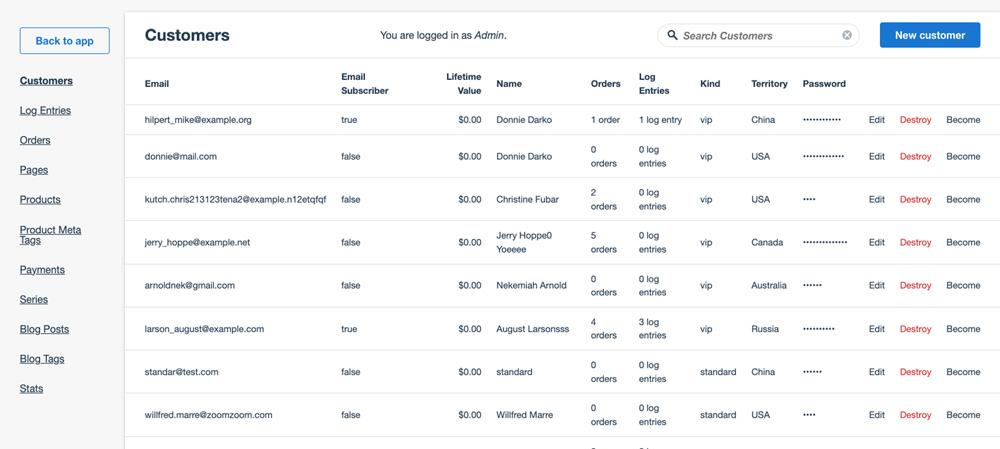
Administrate is deliberately minimal. It generates dashboard classes and ERB views that stay close to Rails and hands them to you to own. That restraint is a genuine strength for simple admins, but as your needs grow it means more of the work lands back on you. Here is where that shows up.
-
A deliberately small field set: Administrate ships a handful of field types. Anything richer, like rich text, tags, key-value pairs, badges, progress bars, or country and currency inputs, is a custom field you write and then keep working across upgrades. Avo ships those out of the box, and add-ons like Nested Records and Reactive Fields take forms further still, letting you edit associated records inside the parent form and update fields live as the user types.
-
No built-in actions: An admin quickly becomes the place you do things, not just view them: approve a user, issue a refund, kick off a background job. Administrate has no actions framework, so those flows are custom controllers and routes you build and own. Avo gives you a first-class actions system with confirmation screens and custom responses, and the Authorization and Custom Controls add-ons let you gate who can run what by role and context.
-
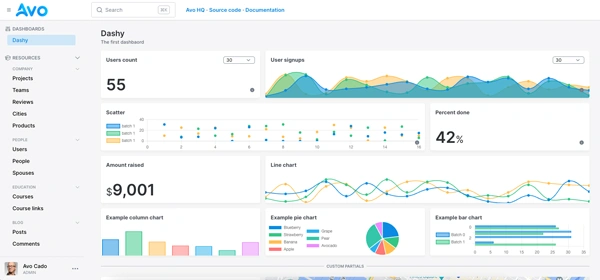
No dashboards, metrics, or charts: Administrate is a CRUD dashboard, not a place to watch your numbers. If you want KPIs, cards, and charts next to your data, that is a separate build. Avo's Dashboards add-on gives you real-time metrics and visualizations so your team can act on trends without leaving the admin.
-
You maintain the generated views: Owning the ERB is great for control, but it cuts both ways: every UI improvement Administrate ships later is one you merge and reconcile by hand, and your customizations are yours to carry forever. With Avo you configure resources in a Ruby DSL and keep getting interface upgrades through bundler, ejecting only the pieces you actually want to own.
-
Leaner docs and a thin plugin ecosystem: Administrate's docs cover the core building blocks (dashboards, fields, controllers) but go less deep than many developers want, and a lot of the community plugins that once filled the gaps are now unmaintained. Avo invests heavily in documentation and, instead of leaning on third-party plugins, ships its own catalog of first-party add-ons that we design, document, and support.
The scope Administrate leaves to you, already built
Notice the pattern in the gaps above. Actions, dashboards, richer forms, real filtering: these are exactly the pieces Administrate deliberately leaves for you to build and then maintain. In Avo they are first-party add-ons, so you install the capability instead of owning the code behind it. Where Administrate's community plugins went quiet years ago, these keep shipping.
Dashboards
Real-time metrics, cards, and charts beside your data, the reporting layer Administrate leaves you to build.
Dynamic Filters
Combine filters into powerful searches so your team finds the exact records it needs, well past Administrate's basic scopes.
Global Search
Jump to any record across every model and relationship from one search box, not one model at a time.
Kanban
Drag-and-drop boards for order processing, content pipelines, and task management, instead of a plain table.
Record Reordering
Drag-and-drop ordering for content and priority lists, something Administrate has no answer for.
Scopes
Segment records by team, department, or any criteria so each user sees the slice that matters to them.
Nested Records
Create and edit associated records right inside the parent form, with no page-hopping.
Collaboration
Comments and status updates on records, so your team coordinates inside the admin instead of around it.
Authorization
Granular, role-based permissions through Pundit policies you already trust.
And the catalog keeps growing: Reactive Fields for forms that respond as the user types, Custom Controls to tune what each role can do, Menu Editor to organize a complex app into clear navigation, Searchable Associations for assigning relationships, and Notifications for the events that matter.
Building something headless or integrated? The JSON API add-on exposes your Avo resources to mobile apps and other services, and HTTP Resource turns an external API into a full Avo resource. An add-on that connects your admin to AI agents over the Model Context Protocol is coming soon. This is the roadmap you get to ride instead of building each piece yourself, so browse the full add-on catalog to see what ships done for you.
When Administrate is the right call
We would rather help you choose well than win every reader, so here is the honest version: for some projects, Administrate is the better fit, and Avo would be overkill.
Reach for Administrate when:
-
Cost has to be zero: Administrate is free and MIT-licensed. If a paid dependency is a non-starter for your project, that is a real and fair reason to pick it.
-
Your needs are simple and likely to stay that way: If it is straightforward CRUD over a handful of models with no dashboards, actions, or heavy customization on the horizon, Administrate's minimalism is a feature, not a limitation.
-
You want to own the views outright: If your team prefers plain generated ERB it can edit directly, with no DSL to learn and no framework opinions to work around, Administrate's convention-first, own-the-code philosophy will feel right at home.
If that sounds like your project, Administrate is a solid, well-crafted choice. If instead you expect your admin to grow into something your whole team runs the business from, keep reading. And if you're already running Administrate, moving isn't a rewrite-the-world project: Avo mounts beside it in the same app, so you can replace your admin one resource at a time in about a week.
Avo: everything you get with Administrate, but better
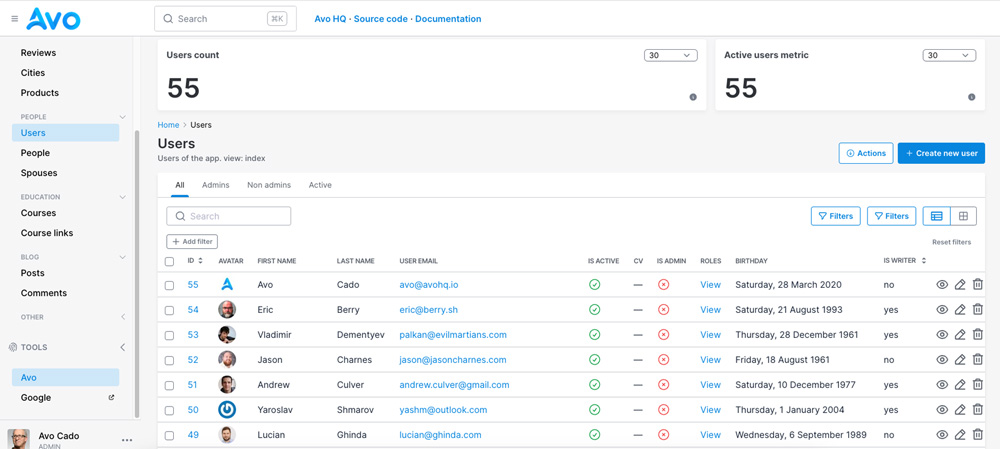
Everything you get with Administrate you get with Avo plus a ton more.
Want to get a blog up and running in 20 minutes? Avo's got your back.
You know how to build a simple blog using Rails scaffolding but you're having second thoughts about building a booking application using Rails? Avo's got your back.
You're a startup founder with limited founding but limitless creativity and determination? Avo's got your back.
Avo is built by a team of driven people that've already used every Rails admin panel in existence and experienced the pain that comes with customizing them to the needs that arise from building real Rails apps used by thousands of users around the world.
Also, Avo is constantly being improved, basing our roadmap and features on feedback given by real users with real needs.
This is what Avo's free plan can contribute to your development flow
-
A vast variety of fields: whatever it's you build with Administrate, you only get a handful of fields from default. This means that you will quickly find yourself customizing code and looking at internals to suit your needs. With Avo you get a lot of fields to help you build your backoffice: text, WYSIWYG textareas with Trix or Tip Tap, password, number, boolean, datetime, taglist, enum, file, image, sound, video, etc.
-
Development speed through sensible defaults: following our best practices can easily get you at 10x development speeds vs your typical Rails scaffold or manual admin set-up.
-
Current Rails best practices: Avo uses Hotwire and Stimulus to bring a highly interactive experience to the table without the need to write boatloads of front-end code.
-
Most common admin features out of the box: It doesn't matter if this is your first or n-th admin panel. Avo can help you build solutions way faster than other alternatives by providing you with the right features at the right time.
-
Excellent documentation: Avo's documentation is one of a kind. We put a lot of effort into documenting even the smallest detail about our product so users can enjoy them with minimal support. If your experience is different, please shoot us an email so we can improve our documentation.
-
Minimal configuration to achieve what you want: we let you customize your admin panel but don't require extenous amount of configuration to do so.
UI is not about the looks, it's about experience
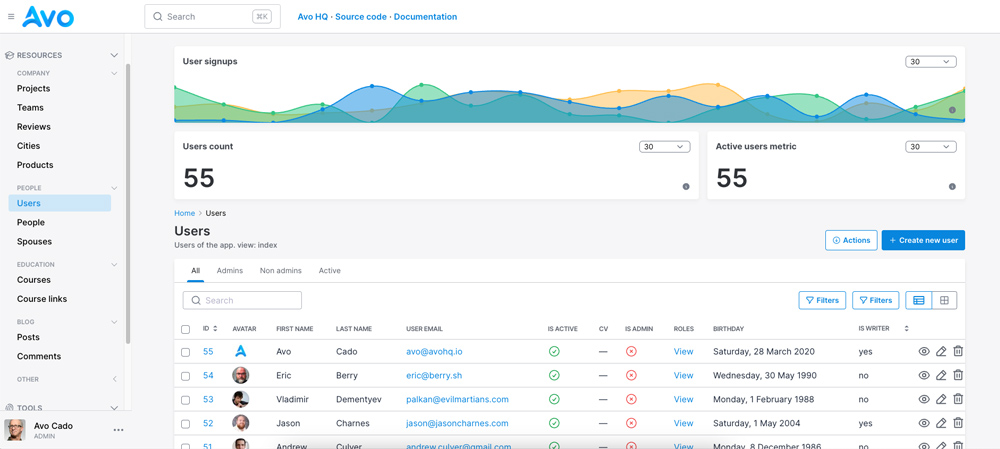
User interfaces are not important because of beauty or aesthetics.
They matter because, good design can help users reach their goals faster by effectively communicating what they do.
That's why Avo looks good by default: we sweat on the little details so you don't have to. That means that you, as a developer, don't have to spend on a designer to get beautiful and usable design. This is free with Avo.
Hey, we're not saying our interface is the slickest and most beautiful ever, but it does its job very well and it helps developers and admins be much more efficient from the get go.
Even though most apps are backed by a database, this doesn't mean that your admin panel should be a glorified database browser.
We've built dozens if not hundreds of admin panels and they almost always start as a way to visualize what's in the database. However, they inevitably grow in complexity: more features, different ways to present information, use cases that nobody thought about at the beginning, etc.
That's why Avo supports many advanced use-cases that enable developers to build complex flows to handle different scenarios that may not seem obvious when you're starting out but that frequently present themselves as you're building admin solutions..
As a consequence, both your admin panel and your application end up being better and you end up saving time and money in the process.
How fast can I build a real application using Avo
Naturally, it depends on the type of app you're building.
If your app, like 90% of the apps, is content centric, you can at least triplicate your development speed using Avo.
Every feature is actually designed to make you more efficient in delivering value to your customers instead of having to write yet another CRUD related view to handle the resources that your application needs.
Speed to market, a must when releasing a new product, is where Avo can help you the most: you can easily get to market in days or weeks instead of months.
Plus, you can rest assured that when the time to customize your admin panel, Avo gets out of the way and lets you personalize your experience as you wish.
I get it, but why is Avo a paid product?
I know, you're probably wondering about the fact that Avo is not 100% a free product.
Even though we have Avo's community license. which is free, some features from Avo are not free.
Most Rails admin libraries are free so you probably wonder: why do these guys think they can charge me actual money to use an admin panel?.
The thing is, you don't really need Avo's premium features to build a great product.
There's plenty of features in the Community version of Avo to help you reach your goals while you're starting with your projects.
However, you can easily get way more value than what you pay for Avo if you consider development time in your purchasing decision.
We've been working on Avo for more than five years now and that shows: considering hiring costs, not even the best Rails dev out there can build a fraction of Avo's features for the price of a license.
Avo 4 is priced per app with unlimited team members, so you can add your whole team without watching the bill scale with headcount.
Not only that but you get features and support that last as long as your license, plus continuous development and improvements. Check our roadmap to see what's ahead for Avo.