











Avo vs. Rails Admin: which one is better?
Let's start by acknowledging we're a little biased, we build Avo every day to help Rails developers all around the globe solve their admin needs and become more efficient.
However here's an honest answer:
When starting out, both Avo and Rails Admin can help you build admin solutions faster, especially when compared to building your own admin from scratch.
But, the differences between these libraries become more obvious as your product grows and customization becomes a priority.
If you decide to use Rails Admin, at some point you will find yourself struggling with customization and using unmaintained libraries to help you build common admin features like charts, direct file uploads, rich text editing, map/location fields, among others.
At this point of your journey, you will regret using an admin framework and starting to wonder if re-building from scratch is worth it.
So let's dive deep and find out why we think that Avo is better suited for admin panel development in 2026 than Rails Admin:
Building admin experiences is hard
We're all familiar with how Rails can help us build better web applications faster.
After all, the famous 15 minute blog video revolutionized the web development world back in 2005.
But don't fool yourself: building truly great admin experiences using Rails in 2026 is not an easy task.
Users expect a lot more from software nowadays and providing them with satisfying experiences is challenging.
Rails Admin has been around for more than 15 years now and that is noticeable in the user experience you get from it.
We absolutely respect how they paved the way for other solutions like Administrate or even Avo.
We would probably not exist if not for the pioneers that came before us and let us build on the legacy of great minds.
But, even though we know that you can build usable admin panels with Rails Admin, we're convinced Avo is a better solution for the needs of users and developers.
To land our point, let's explore some of the most important issues you would have if deciding to use Rails Admin as of today:
Rails Admin limitations
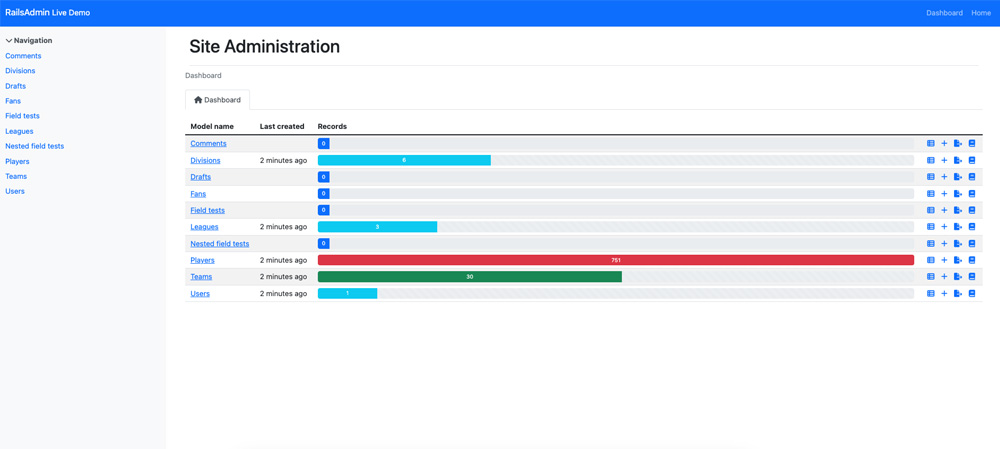
Rails Admin has no shortage of features. After more than 15 years of development, it includes a lot of the most common features you need to build admin panels.
Yet, the framework presents some pressing issues when considering the long term and maintainability of an admin solution built using it.
Let's walk through them:
-
Messy configuration: Avo and Rails Admin use a DSL (domain specific language) to handle customization but Rails Admin requires you to do it in a messy way: you have to decide between polluting your models/concerns or configuring everything in an initializer. All of these options are sub-optimal and will lead to issues down the road.
-
Sub-par documentation: Rails Admin relies on its GitHub Wiki to document features and, while any documentation is better than no documentation, Github Wikis are probably not the best fit for documenting a library of that size. Plus, some prominent features are poorly documented leaving you empty-handed and having to resort to scarce or antique internet resources like blog posts or old Stack Overflow answers.
-
In maintenance mode: Rails Admin still gets the occasional commit, but its last release, 3.3.0, shipped in December 2024, and 2025 brought only a few upkeep commits. That is a sign of stability, but also of stagnation: if you need a feature it doesn't have, you are unlikely to see it added.
-
Customization is hard: because of the way it was designed and the specific choices made for their DSL, customizing Rails Admin is not an easy task. You can do some basic customization following their documentation but you will probably get stuck when trying to do bigger customizations, especially those that pertain to features they lack like advanced custom fields, charts, granular search and filtering, visual customizations, etc.
-
UI is not it's strong suite: their UI lacks clarity, visual hierarchy and is generally confusing. You might think admin panel users don't need good UI because they can be trained to use any resource you give them disregarding ease of use but that's not the case anymore. Even the most tech-savy users are accostumed to good user experiences and demand more from user interfaces nowadays.
-
Dependant on unmaintaned plugins for important features: some Rails Admin features depend on third party code that's no longer maintained. This leaves you with a tough decision: proceed with stale code to build the features your admin panel needs or maintain the code yourself. Obviously, none of these choices is ideal and can lead you to spend more time caring about third party code than building your application.
-
Still ships jQuery: Rails Admin 3 did modernize, moving to Bootstrap 5 and Turbo, but it still bundles a vendored copy of jQuery. Neither dependency is a dealbreaker on its own, yet its Bootstrap styles can collide with your own CSS, and plenty of developers in 2026 would simply rather not carry jQuery. Avo leans on Tailwind and Stimulus instead.
-
Friction on Rails 8 with Propshaft: Rails 8 makes Propshaft the default asset pipeline, and Rails Admin still relies on Sprockets. On a Propshaft app you end up stubbing missing APIs and hand-extracting its stylesheets, scripts, and fonts to get it running. It is a solvable problem, but it is time spent wrestling the asset pipeline before you write a single line of admin code.
Avo: picking up where Rails Admin left
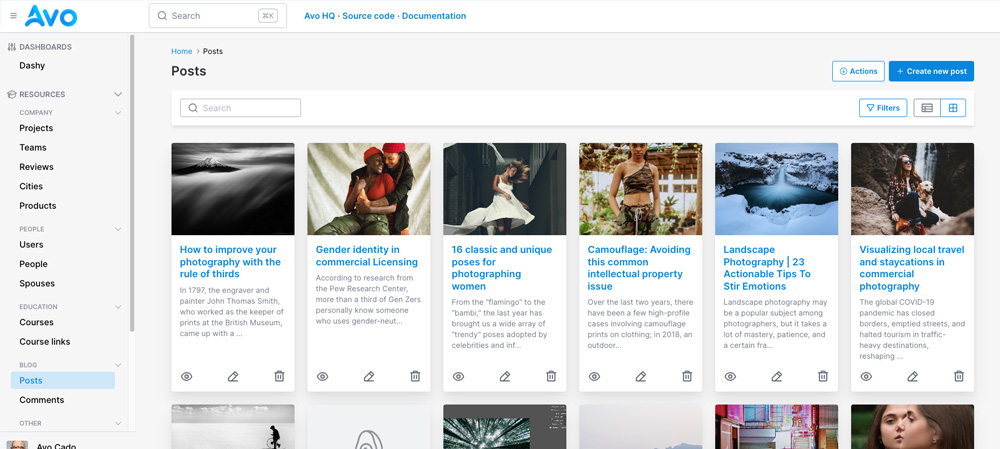
Avo is the natural evolution of the Rails admin framework.
It lets you build a quick and easy admin panels when you're starting out with while also letting you customize them down the road when the time to do so comes.
We've built a lot of admin panels and became familiar with the pitfalls that arise with time when building admin experiences
That's why we dedicate a lot of time to making Avo the best Rails admin framework by constantly improving with constant user feedback.
This is what makes Avo a better alternative to Rails Admin:
-
Fields galore, if you need it Avo probably has it: Avo comes with a vast variety of fields that allow you to meet the needs of most starting Rails applications without resorting to customization: text, WYSIWYG textareas with Trix or Tip Tap, password, number, boolean, datetime, taglist, enum, file, image, sound, video, etc.
-
Easy customization: You can customize Avo using our light DSL but you can also customize partials, fields, views, controllers and even styles and Javascript.
-
Failproof installation process: You can start developing with Avo in a matter of minutes. The installation process is friendly and very quick. And, if by any chance, you encounter an error while installing Avo you can always reach out to us via Github or our Discord Channel. We've very active on those and can promptly help you solve any issues you have.
-
Great documentation: Avo's documentation is an order of magnitude better than Rails Admin's. We work hard to thoroughly document every feature because we know that a lack of good documentation is one of the major time sinks when developing using admin frameworks. Also, we're constantly improving our documentation and documentation processes to make your experience better every day.
-
First-party add-ons instead of stale plugins: Where Rails Admin points you at community plugins that stopped being maintained years ago, the capabilities you'd reach for live in Avo's own catalog of add-ons, each designed, documented, and supported by us. Need charts, or drag-and-drop reordering, or role-based permissions? That's the Dashboards, Record Reordering, and Authorization add-ons, not a 2014 gem you now have to babysit.
-
Constant improvements: Unlike Rails Admin, Avo is adding features while you're reading this. Our roadmap is a testament of our constant refinement process: we're commited to providing our users with their best admin experience to date and we're confident we are making it happen.
Where Rails Admin stops, Avo's add-ons keep going
Rails Admin gets you CRUD screens quickly, but the moment you need more than that, you're back to hunting for a community plugin and hoping it's still maintained.
Avo answers those exact needs with a catalog of first-party add-ons. Each one is built, documented, and supported by us, so you drop in the capability you were about to build by hand and move on. Here are the ones Rails Admin users reach for most:
Dashboards
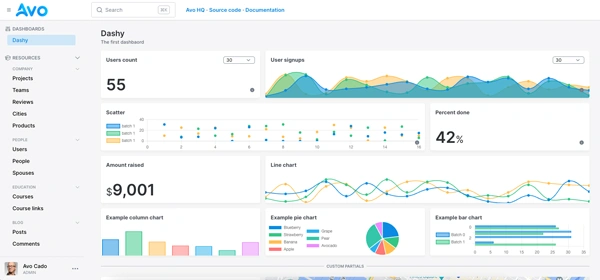
Give stakeholders real-time metrics and charts at a glance, the visualization layer Rails Admin never had.
Dynamic Filters
Let your team combine filters and find the exact records they need instantly, instead of scanning long lists.
Global Search
Search across every resource and its relationships from one box, so nobody has to know which screen a record lives on.
Authorization
Decide exactly what each role can see and do through Pundit policies you already trust, rather than an all-or-nothing login.
Kanban
Run order processing, content pipelines, or task queues on drag-and-drop boards instead of editing a status column by hand.
Nested Records
Create and edit associated records right inside the parent form, no page-hopping to stitch relationships together.
Record Reordering
Drag records into the order you want for content and priority lists, something Rails Admin leaves entirely to you.
Scopes
Segment data by team, department, or any criteria you define, so each person works from the slice that's theirs.
Collaboration
Keep the conversation on the record with built-in comments and status updates, instead of chasing context in Slack.
That's a slice of the catalog. Others cover in-app notifications, reactive fields that respond to input, a JSON API for your resources, and turning any external service into an HTTP Resource. The difference from Rails Admin's plugin ecosystem is the important part: these are maintained by the same team that maintains Avo, so adopting one is not a bet on whether someone still cares about it.
Avo's UI: our love letter to admin experiences
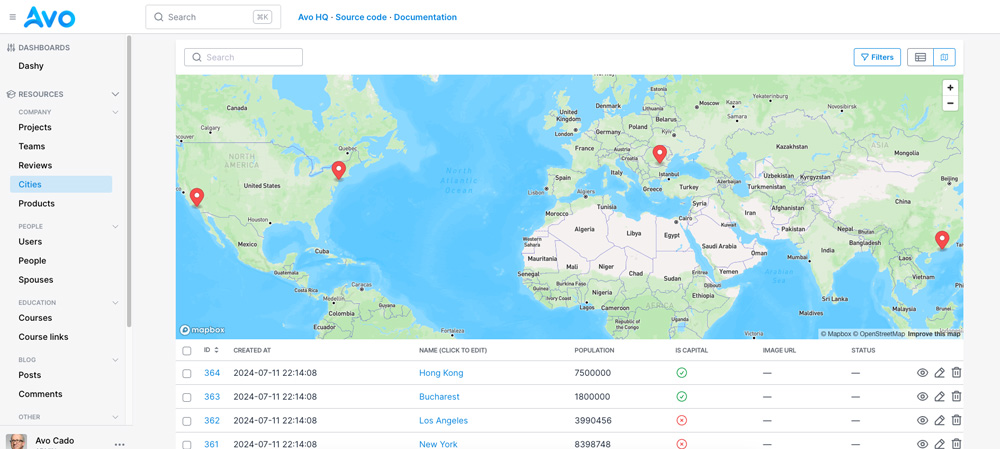
User interfaces are usually one of the most prominent weaknesses of admin libraries.
The long-held belief that admin facing users are less demanding when it comes to UI/UX is not true anymore.
In this day and age, even products made for developers put a lot of effort and care towards building great user interfaces.
That's why we refined our UI with great care for details and with the sole goal of achieving a seamless experience for our users.
We're not claiming our UI to be the most beautiful out there, that's a very subjective point of view anyways. What we're saying is that our interface is clear, communicative and gets out of your way when you need it to.
What we know for sure is that Avo is not a database browser kind of admin panel. You can expect to build useful admin experiences using Avo and delaying the custom design work until you can afford it.
We put a lot of thought towards our product so you can bypass the admin building work and dedicate yourself to what makes your application unique.
Can I be more productive with Avo than with Rails Admin?
Absolutely! We're convinced Avo empowers developers to be more productive from the get go.
At first, you may compare Rails Admin and Avo and maybe conclude that they're both similar in features or development speed. You will probably achieve the same speed improvements from both solutions.
Nevertheless, you will feel Avo's true power when your application becomes more complex and customization becomes a necessity.
At that moment, Avo's strengths and Rails Admin weaknesses will become evident.
You will feel that Avo's ease of customization and ejection features provide you with more options to handle your admin needs.
And, above everything else, you will be thankful for Avo's thoughtful customization features and design centered around separation of concerns.
Who should switch, and who can stay
We would rather help you make the right call than talk everyone into switching, so here's the honest version.
Move to Avo if you want an admin that keeps growing with your product: you're on Rails 8 with Propshaft and don't want to fight the asset pipeline, you need charts, dashboards, granular filtering, rich fields, or fine-grained authorization, you care about the UI your team looks at every day, or you simply don't want your admin depending on plugins that stopped being maintained years ago. Avo is actively developed and supported by the people who build it, so the features you're missing today are the ones we're shipping next. When you do decide to move, the switch fits in about a week: Avo mounts beside Rails Admin in the same app, so you can port your admin one resource at a time without ever taking it offline.
Staying on Rails Admin is reasonable if you have a simple, stable internal CRUD tool that already works, you're happy on Sprockets, and you don't expect to add much to it. It's mature and battle-tested, and "it works and we never touch it" is a perfectly good reason to leave it alone. The build-vs-buy math changes the moment you start wishing it did more, because that's the point where you'd be maintaining stale plugins or rebuilding from scratch.
Ok but isn't Avo a paid product?
Yes and no. Avo comes with a generous free Community license that lets you build perfectly usable admin panels without paying a cent, which is already more than enough to replace a basic Rails Admin setup.
On top of that, we have paid plans. Avo 4 is priced per app with unlimited users, so you can add your whole team without watching the bill climb with headcount.
By having paid plans, we make sure that we can keep making Avo better for each one of our users.
We're constantly improving our product and we have a very tight release cycle meaning we regularly improve Avo to better suit our free and paid customers needs.
So, even if you don't plan on spending a dime to build your next admin panel, Avo being a paid product benefits you by providing you with a better and more polished product.
We like to think that this is a win-win situation that can also ensure Avo is here for the long term.
Plus, even our paid plan gives you way more features than the best Rails developer would struggle to build in months, so you end up saving money even if you decide to pay for Avo.