




CSRF, also known as Cross-Site Request Forgery, is a critical web application vulnerability that, if exploited, can allow attackers to make users perform actions that they don't intend to perform.
Fortunately, Rails comes with CSRF protection by default but, understanding the vulnerability can be useful to avoid making mistakes that can put our users in danger.
Let's start by understanding what CSRF is:
What is CSRF in Rails?
CSRF is a type of malicious exploit where unauthorized requests are performed to a web application on behalf of a user that the application trusts.
CSRF attacks are designed to do this using the victim's credentials and permissions and this can result in unwanted modification of application state or data.
It works because as long as a user is logged in to a web application, the browser maintains session information that is used by the application to check for the user's identity.
The attack is done when a user visits a malicious site that makes a hidden request that performs a change of state, like a bank transfer or anything that might be of value for the attacker, to our application.
Let's see how a typical CSRF attack looks like:
The anatomy of a CSRF attack
According to CVE (Common Vulnerabilities and Exposures) stats posted in the Rails guides, CSRF attacks are very rare: they represent less than 0.1% of them. However, having a vulnerable application can result in severe issues, so we shouldn't take CSRF protection for granted
Even though there are many ways in which the attack can be performed, it usually looks like this:
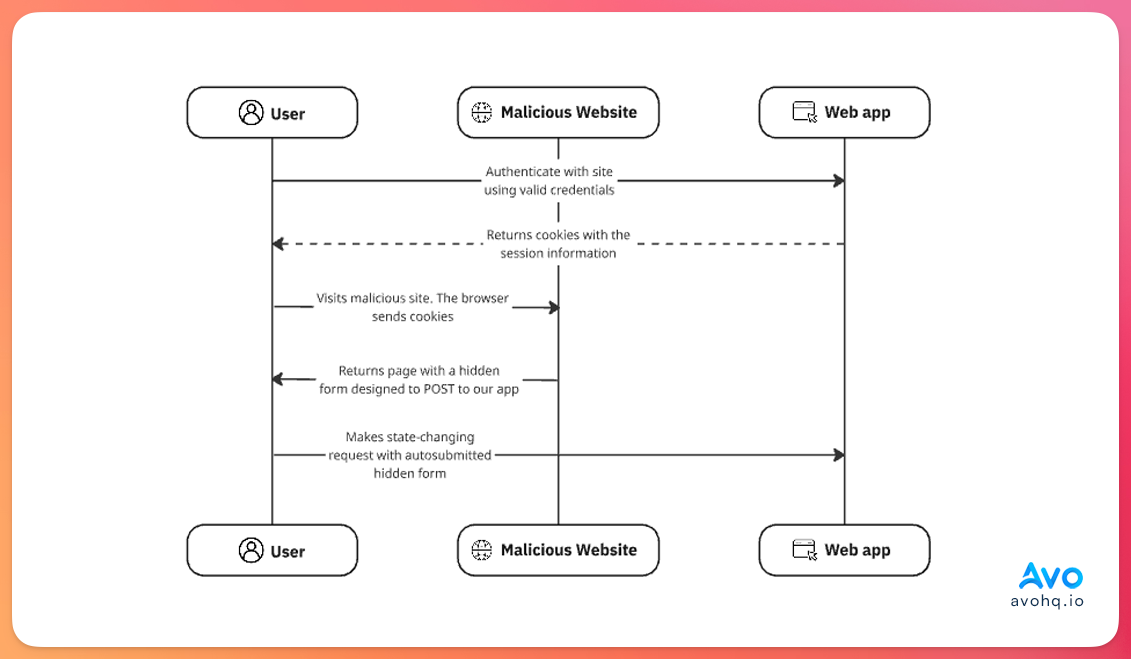
They usually start with some type of communication that contains a link to the malicious site.
Maybe the most naive version is using a GET request that modifies the state of the application. For example, if our application allowed for some type of balance withdrawal or transfer an attacker might use a link like: example.com/wallet/transfer?beneficiary=1295&amount=1000
If the user clicks on the link, the browser sends the session information and the transfer is made to the user with the 1295 id for an amount of 1000.
Of course, this is not only a failure to protect against CSRF attacks but also a failure to avoid having any state-changing GET routes.
Hidden form submission
The second scenario where a CSRF attack can take place is very similar to the previous example, it can start with an email that contains a link to the malicious website.
On that page, a hidden form that performs a state-changing request to our application is rendered but is invisible for the user so they will probably won't notice that the request was performed.
<form id="form" action="https://example.com/wallet/transfer" method="POST">
  <input type="hidden" name="beneficiary" value="1234">
  <input type="hidden" name="amount" value="1000">
</form>

<script>
  const form = document.querySelector("#form")
  document.addEventListener("DOMContentLoaded", (evt) => {
    form.submit();
  })
</script>
In both cases, the attack can be prevented with the Rails built-in CSRF protection. Let's understand how that works:
CSRF protection in Rails
Out of the box, and unless we explicitly remove it, Rails comes with built-in CSRF protection.
The main mechanism is the use of a verification token known as the CSRF token which is included in each page that Rails renders. It's required for state-changing request methods (POST, PUT, PATCH, or DELETE) to prove the request originated from the app itself.
This token is generated using a session-specific CSRF token with a masking technique which makes the string that's rendered in the page change for every request while the underlying token for the session stays the same.
Behind the scenes, the process looks like this:
-
Token generation: when the user first visits our application, Rails generates a random token and stores it encrypted in the user session. This token can be accessed internally using
session[:csrf_token]. -
Token embedding: the token is automatically embedded into every page that Rails renders with the
csrf_tokenmeta tag and into every form calling theform_authenticity_tokenhelper method. This is handled by Rails, we don't have to do anything. -
Verification: when the server receives a state-changing request, it compares the submitted token with the one stored in the session. If they don't match or if the token is missing, an
ActionController::InvalidAuthenticityTokenerror is raised. If they match, the request is processed normally.
Knowing this, it's important to clarify a couple of things:
-
The CSRF token is unique per session: if we inspect the HTML for any Rails-rendered page, we'll see that the value for the
csrf_tokenmeta tag changes with each request. However, this doesn't mean that the token changes for every request, it happens because Rails masks the token. Theform_authenticity_tokenmethod actually calls themasked_authenticity_tokenwhich uses a one-time pad encryption. - Attackers cannot access this token: we mentioned that attackers exploit the fact that the browser maintains and sends the session information for every request. However, this doesn't mean that they can access the session information to retrieve the token.
-
JavaScript access: malicious actors cannot access the CSRF token using JavaScript unless our application has an XSS vulnerability, which would provide them with access to the session anyway. This happens because Rails checks against this using the
Originheader to make sure that the requests come from our application origin.SameSite cookie attribute
On top of this, Rails uses the
SameSite=Laxcookie attribute by default which sends cookies only for: Same-site requests which are requests that originate from the same domain.
Top-level navigation: when a user clicks a link to navigate to our site.
However, it doesn't send cookies for cross-site requests initiated by JavaScript or embedded requests like images, iframes, etc.
Disabling CSRF verification
There are some cases where we might want to disable CSRF verification.
A good example is when our application needs to receive requests from external applications that use any state-changing method like POST requests.
These are common when working with webhooks or applications that we trust with a different origin that make requests to our apps.
To disable the verification, we need to use the skip_forgery_protection method which is the same as writing skip_before_action :verify_authenticity_token:
class WebhooksController < ApplicationController
  skip_forgery_protection
end
This setup will skip CSRF verification for every method in the controller.
Of course, use this helper with caution for requests from actors that you trust and make sure to audit your application for the usage of this method to avoid places where we might not be verifying for token validity where we should.
Develop apps 10 times faster with Avo
Develop your next Rails app in a fraction of the time using Avo as your admin framework.
Start for free today
CSRF token in API mode
If our Rails application is an API that's consumed by a frontend client that lives in the browser and uses session-based authentication, you need to make sure that CSRF token validation is handled appropriately.
This is especially true if we created the application in the API-only mode because the CSRF protection is disabled by default.
Luckily, we can use the @rails/request.js library adds the CSRF token to requests using the X-CSRF-TOKEN header.
In Rails, we can make use of it in the following manner:
import { post } from "@rails/request.js"

async createPost () {
  const response = await post('localhost:3000/posts', { body: JSON.stringify(title: 'My first Post') })
  if (response.ok) {
    const body = await response.json()
  }
}
If we inspect this request, we would see that the authenticity token was included in the X-CSRF-TOKEN automatically:
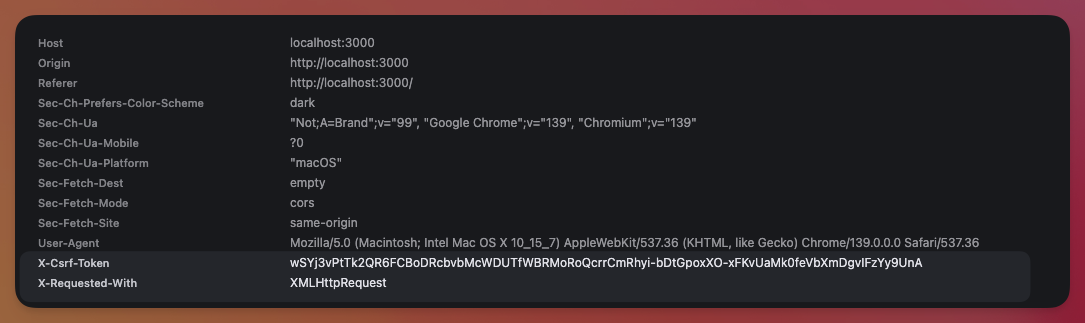
Otherwise, if our application uses other Rails API authentication methods like JWT or bearer tokens, we don't need to worry about CSRF verification and we can disable it if we didn't create the application using API-only mode:
class Api::V1::ApplicationController < ApplicationController
  skip_before_action :verify_authenticity_token
end
Further reading
Rails API Authentication with the auth generatorBest practices
Keep these things in mind when working with Rails and CSRF protection:
-
Try to use form helpers: stick to them as Rails automatically adds the
form_authenticity_tokenby default when using form helpers. - Never change state with GET requests: we mentioned this a couple of times in the article but it's never enough. Make sure your application doesn't make state-changing requests using the GET method. Be vigilant about it.
- Keep CSRF protection enabled: unless you have a good reason not to, like webhook endpoints or an API that doesn't use session-based authentication, always keep CSRF protection enabled. If you find a bug that requires CSRF protection to be removed, like we showed in the Login with Apple article, try to fix the root instead of disabling protection. If you need to disable it, make sure to understand why you're doing it and the potential consequences.
- Keep an eye out for XSS vulnerabilities: an XSS vulnerability can bypass CSRF protection by reading the value of the authenticity token.
-
Perform regular audits: try to perform audits, automated or not, to find instances of
skip_forgery_protectionusage to see whether it's justified or not. -
Use SameSite cookies: Rails uses
SameSite=Laxby default. Stick to it unless you have a strong reason to change it. ## Summary Cross-Site Request Forgery (CSRF) is a vulnerability that achieves state-changing requests without authorization from logged-in users because of the fact the browser sends session information for every request, even if they originate from a different domain.
Rails protects us out of the box by embedding an authenticity token into every page and verifying it on every state-changing request.
Together with the SameSite cookie attribute, CSRF protection in Rails stops malicious sites from piggybacking on a user's session and causing unintended side effects.
As developers, we need to be vigilant about our application security by: never disabling CSRF protection without thoughtful consideration, never performing side effects behind GET routes, avoiding XSS vulnerabilities and making sure to audit our code frequently to make sure we don't make these mistakes.