




Exporting data to CSV is one of those features every Rails app grows into. Someone on the team wants the users list in a spreadsheet, finance wants last month's orders, support wants to hand a customer their own records. The good news is that Ruby ships almost everything we need. The catch is that the version of "export to CSV" you find in most tutorials works beautifully on your laptop with 200 rows and then quietly falls over when a real table has half a million.
This guide starts with that quick version, because for small exports it is the right amount of code. Then we take it to the scale where it breaks, show exactly where the memory goes (with numbers we measured), and rebuild it so a million rows costs the same memory as a hundred. We finish with the two details every tutorial skips and every user notices: broken characters in Excel, and CSV files that can run formulas on the person who opens them.
A note before we start: the csv gem
Ruby's CSV library used to be always available. As of Ruby 3.4.0 it became a bundled gem, which means you now have to declare it. If you are on Ruby 3.4 or newer, add it to your Gemfile:
# Gemfile
gem "csv"
Then bundle install. On older Rubies a bare require "csv" still works, but adding the line is harmless and future-proofs the app.
The quick version (and when it is enough)
Let's export a users table. First we register the CSV format so Rails knows what a .csv request means. Most recent Rails versions already register it, but being explicit never hurts:
# config/initializers/mime_types.rb
Mime::Type.register "text/csv", :csv
Next, a class method on the model that turns a collection into a CSV string. CSV.generate builds the whole document and returns it as a String:
# app/models/user.rb
require "csv"

class User < ApplicationRecord
  def self.to_csv
    CSV.generate do |csv|
      csv << column_names
      all.each { |user| csv << user.attributes.values }
    end
  end
end
Finally, the controller responds to a .csv request by sending that string as a download. send_data (from ActionController::DataStreaming) sets the download headers for us, and the filename option names the file the browser saves:
# app/controllers/users_controller.rb
def index
  @users = User.all

  respond_to do |format|
    format.html
    format.csv do
      send_data @users.to_csv, filename: "users-#{Date.current}.csv"
    end
  end
end
Add a link to users_path(format: :csv) and you have a working export. For an admin screen listing a few hundred or a few thousand rows, stop here. This is clear, conventional Rails, and rewriting it to be fancier would be effort you do not need to spend. Reach for the rest of this guide when the table gets big or the export starts timing out.
Where the quick version breaks
The problem is memory, and it hides in two places at once.
The first sink is User.all. Calling .all.each loads every matching record into a Ruby array before you touch a single one. The second sink is CSV.generate: it concatenates the entire file into one String and keeps it in memory until send_data finishes writing it to the socket. So at the peak you are holding all the records and the whole rendered file at the same time.
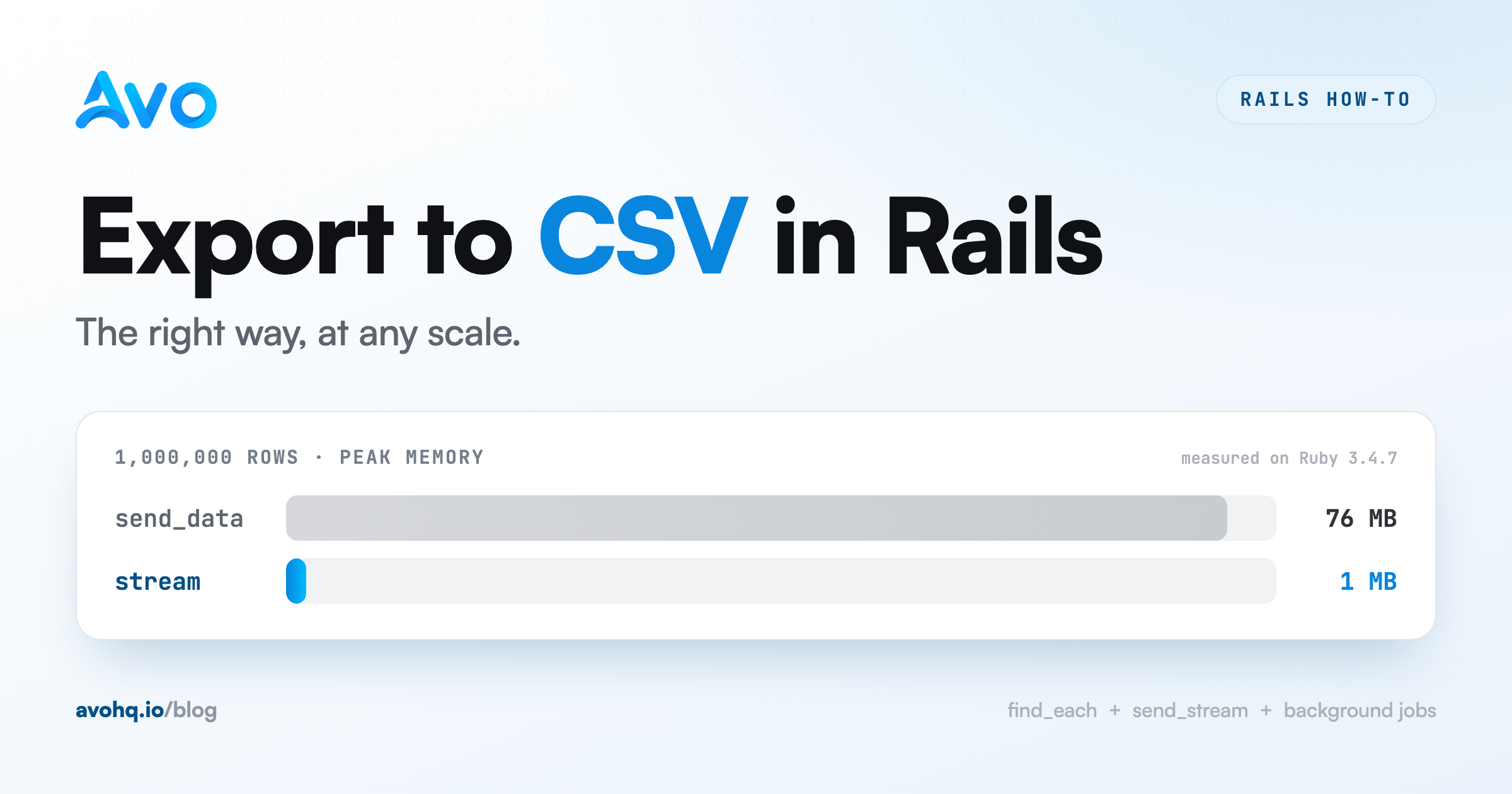
To put real numbers on it, we ran a benchmark on Ruby 3.4.7 comparing two ways of producing the exact same CSV: building the whole string in memory (what send_data does) versus writing it out one row at a time. We measured the resident memory retained at the point each approach holds the most, plus wall time.
| Rows | CSV file size | In-memory (retained RSS) | Streaming (retained RSS) | In-memory time | Streaming time |
|---|---|---|---|---|---|
| 100,000 | 7 MB | 10 MB | 1 MB | 0.33s | 0.36s |
| 500,000 | 36 MB | 39 MB | 1 MB | 1.78s | 1.77s |
| 1,000,000 | 73 MB | 76 MB | 1 MB | 3.25s | 3.88s |
Here is the whole benchmark, so you can run it against your own Ruby and row shape:
# csv_bench.rb
# run: ruby csv_bench.rb memory 1000000
#      ruby csv_bench.rb stream 1000000
require "csv"
require "tempfile"

mode = ARGV[0]                        # "memory" (send_data) or "stream"
n    = (ARGV[1] || "1000000").to_i
rss  = -> { `ps -o rss= -p #{Process.pid}`.to_i } # resident memory, KB

row = ->(i) { [i, "User #{i}", "user#{i}@example.com", "active"] }
GC.start
out = Tempfile.new(["export", ".csv"])

if mode == "memory"
  string = CSV.generate { |csv| n.times { |i| csv << row.call(i) } } # whole file in RAM
  peak = rss.call
  out.write(string)
else
  CSV.open(out.path, "w") { |csv| n.times { |i| csv << row.call(i) } } # one row at a time
  peak = rss.call
end

puts "#{mode}: #{peak / 1024} MB retained for #{n} rows"
Two things stand out. The in-memory build grows in lockstep with the export: roughly the whole file sits in your process, so a 1M-row export costs about 76 MB. Streaming stays flat at around 1 MB no matter how many rows go through it. Time is basically the same either way, so you are not trading speed for memory, you are just choosing whether to hold the file or let it flow.
We fix the two sinks one at a time.
Fix one: stop loading every record
The query side is the easy half. Active Record's find_each loads records in batches (1000 at a time by default) and yields them one by one, so you never hold the full table in memory. On Active Record models it is a drop-in replacement for all.each:
# app/models/user.rb
def self.to_csv
  CSV.generate do |csv|
    csv << column_names
    find_each { |user| csv << user.attributes.values }
  end
end
One caveat before you swap it in everywhere: find_each batches by primary key and ignores any order you set on the query. If the export has to come out sorted a particular way, sort the finished file, or keep the plain in-memory version for that one case where the row count is small enough to afford it.
This bounds the record side, but CSV.generate is still building one big string, so the file itself is still fully in memory. For that we have to stop returning a string at all.
Fix two: stream the response
Instead of building the whole file and then sending it, we write each row to the response as we produce it. Rails 7.2 added send_stream for exactly this. It comes from ActionController::Live, so we include that module in the controller. We use CSV.generate_line to turn each row into a single line of CSV text and write it straight to the stream:
# app/controllers/exports_controller.rb
class ExportsController < ApplicationController
  include ActionController::Live

  def users
    send_stream(filename: "users-#{Date.current}.csv") do |stream|
      stream.write CSV.generate_line(User.column_names)

      User.find_each do |user|
        stream.write CSV.generate_line(user.attributes.values)
      end
    end
  end
end
Now only one row exists in memory at a time, on both the query side and the CSV side. This is the streaming column from the benchmark: flat memory, all the way up.
A few things to know before you ship it:
-
send_streamneedsinclude ActionController::Live. That is what defines the method. It is easy to leave out and then get aNoMethodError. -
Livechanges how the action runs. It serves the request in its own thread and checks out a separate database connection for the duration, and once the first bytes are sent the response is committed as a200, so you cannot switch to an error status if something blows up mid-stream. Keep streaming exports in their own controller (as above) so this behavior does not affect your normal actions. -
Run behind a non-buffering server. Puma streams fine. WEBrick buffers the whole response and defeats the point, so do not benchmark this in a bare
rails serveron old setups. -
Watch your proxy and middleware. Nginx buffers responses by default; send the
X-Accel-Buffering: noheader to turn it off for the export.Rack::ETagalso buffers the body to compute a digest, so exclude the export path if you have it enabled.
On Rails older than 7.2 you use the same ActionController::Live module, just without the send_stream helper: set your headers, write to response.stream directly, and close it in an ensure.
For the really big exports: a background job
Streaming keeps memory flat, but the export still runs inside a single web request. If generating the file takes 30 seconds because it joins three tables and formats every row, you are holding a request open (and risking a proxy timeout) the whole time. Past a certain size the right move is to stop making the user wait at all.
The pattern: generate the file in a background job, store it on S3 with Active Storage, and notify the user with a download link when it is ready.
# app/jobs/user_export_job.rb
class UserExportJob < ApplicationJob
  queue_as :default

  def perform(requester)
    export = requester.exports.create!(status: "processing")

    Tempfile.create(["users", ".csv"]) do |file|
      CSV.open(file.path, "w") do |csv|
        csv << User.column_names
        User.find_each { |user| csv << user.attributes.values }
      end
      file.rewind
      export.file.attach(
        io: file,
        filename: "users-#{Date.current}.csv",
        content_type: "text/csv"
      )
    end

    export.update!(status: "ready")
    ExportMailer.ready(export).deliver_later
  end
end
Note the Tempfile: writing to disk row by row keeps the job's memory flat too, the same principle as streaming, applied to the worker instead of the request. Active Storage then uploads the finished file to your bucket and gives you a URL to email. The user clicks "Export", gets an "we'll email you when it's ready" message, and the web process is free the entire time.
The two details every tutorial skips
Excel and encoding
Open a UTF-8 CSV with accented names in Excel on Windows and you will often see José turn into José. The reason is that Excel does not assume UTF-8 unless the file starts with a byte order mark (BOM), the three-byte UTF-8 signature EF BB BF. Prepend it and Excel reads the file correctly:
BOM = "\uFEFF"

send_data BOM + User.all.to_csv,
  filename: "users-#{Date.current}.csv",
  type: "text/csv; charset=utf-8"
For the streaming version, write the BOM as the very first thing on the stream, before the header row. The BOM is a Unicode signature and other tools ignore it, so adding it is safe. This behavior in Excel is not formally documented by Microsoft, but it is consistent enough that shipping the BOM is standard practice for spreadsheets people open in Excel.
CSV injection
This one is a genuine security issue and almost no export tutorial mentions it. If a cell value starts with =, +, -, or @, spreadsheet software (Excel, Google Sheets, LibreOffice) can treat it as a formula. A user who sets their display name to =IMPORTXML(...) or a command string can turn your innocent export into code that runs on whoever opens it. OWASP calls this CSV injection, or formula injection.
The mitigation is to neutralize any cell that begins with one of those characters, for example by prefixing it with a single quote so the spreadsheet treats it as text:
def csv_safe(value)
  string = value.to_s
  string.match?(/\A[=+\-@\t\r]/) ? "'#{string}" : string
end
Run every user-supplied cell through it while building the row:
csv << user.attributes.values.map { |value| csv_safe(value) }
Putting it together
The snippets above each showed one idea in isolation. Here is the streaming export with all of them wired in: find_each batching, the BOM for Excel, and csv_safe on every value.
# app/controllers/exports_controller.rb
class ExportsController < ApplicationController
  include ActionController::Live

  def users
    send_stream(filename: "users-#{Date.current}.csv", type: "text/csv; charset=utf-8") do |stream|
      stream.write "\uFEFF" # UTF-8 BOM so Excel renders accents
      stream.write CSV.generate_line(User.column_names)

      User.find_each do |user|
        safe_row = user.attributes.values.map { |value| csv_safe(value) }
        stream.write CSV.generate_line(safe_row)
      end
    end
  end

  private

  def csv_safe(value)
    string = value.to_s
    string.match?(/\A[=+\-@\t\r]/) ? "'#{string}" : string
  end
end
This is the version to reach for once real users, and the data they control, are going through the export.
Summary
- For a small export, a model
to_csvbuilt onCSV.generateplussend_datain the controller is the whole job. Do not over-build it. -
send_dataholds the entire file in memory, andall.eachholds every record. We measured a 1M-row export retaining about 76 MB per request as a result. - Read records with
find_eachand stream the response withsend_streamto keep memory flat at around 1 MB regardless of size, at basically the same speed. - For exports big or slow enough to risk a timeout, move generation to a background job, write to a
Tempfile, store the file with Active Storage, and email a download link. - Add a UTF-8 BOM for Excel, and sanitize cells starting with
= + - @to prevent CSV injection.
Best practices
- Let users export what they are looking at. If a screen has filters, apply the same scope to the export so the CSV matches the view.
- Select only the columns you need instead of dumping
attributes.values. It is smaller, faster, and avoids leaking internal fields. - Put a sensible ceiling on synchronous exports and send anything above it through the background job path.
- Name the file with a date so downloads do not collide in the user's Downloads folder.
- Write a request spec that asserts the header row and one data row. CSV output is easy to break silently when the model changes.
You might not need to build this at all
Everything above is a few dozen lines, but it is a few dozen lines you now own: the streaming, the batching, the BOM, the injection escaping, the background job, and every edge case that shows up after launch. On a single export that is fine. Across a whole admin or back-office screen, it adds up to a second app you are building and maintaining next to the one your customers use.
That second app is exactly what Avo is for. Avo is an admin framework for Rails: you point it at your models and get the resources, filters, and actions without building the back office by hand, and an export becomes an action you drop on a resource. Avo's docs even walk through an export-to-CSV action built on the same CSV library from this guide, so you can fold in the streaming and sanitizing tricks above where you need them. The build-vs-buy case is not that you couldn't write any of this, you just did. It is that the admin around it, and the years of maintenance, stop being yours to carry. If you would rather spend your time on the product your customers see, Avo's add-ons cover the back-office features every Rails app eventually needs.
Develop apps 10 times faster with Avo
Develop your next Rails app in a fraction of the time using Avo as your admin framework.
Start for free today
FAQ
Do I need the csv gem in Ruby 3.4?
Yes. As of Ruby 3.4.0, csv is a bundled gem rather than an always-available default, so add gem "csv" to your Gemfile and run bundle install. On Ruby 3.3 and earlier require "csv" still works without it.
How do I export CSV without loading everything into memory?
Two changes. Read records with find_each so Active Record loads them in batches of 1000 instead of all at once, and stream the response with send_stream (Rails 7.2+) writing one row at a time, so you never build the whole file in memory. In our benchmark this kept a 1M-row export at about 1 MB instead of 76 MB.
Why does Excel show garbled characters like José?
Excel does not assume UTF-8 unless the file starts with a UTF-8 BOM (the bytes EF BB BF). Prepend "\uFEFF" to the CSV and set charset=utf-8, and accented characters render correctly.
Is CSV export a security risk?
It can be. If a cell starts with =, +, -, or @, spreadsheet software may run it as a formula (CSV injection). Sanitize user-supplied values by prefixing any such cell with a single quote before writing the row.
How do I handle exports that time out?
Move the work off the request. Generate the file in a background job, write it to a Tempfile, store it with Active Storage, and email the user a download link when it is ready. The request returns immediately and nothing sits open waiting.
Have a good one and happy exporting.